Have you ever seen some websites with a secure padlock icon? Others make your browser warn you. In today’s world, keeping your online space safe is key for any business in the U.S.
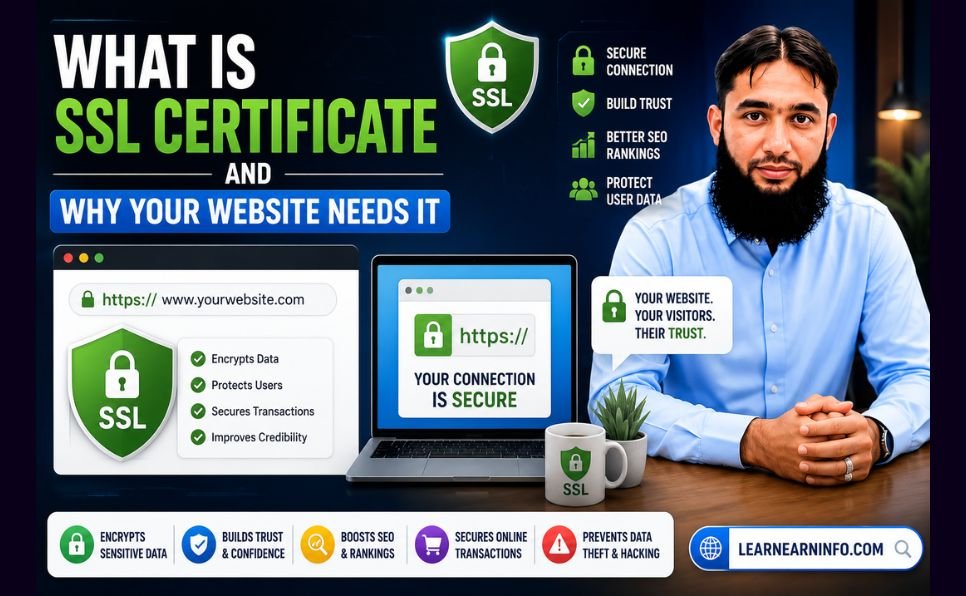
An SSL Certificate is like a digital ID card for your site. It makes sure data between your server and browser stays safe and private.

SSL Certificate and Website security
Making your site secure is the first step to trust with visitors. Without it, your site and user info are at risk of being stolen by bad guys.
Key Takeaways
- Encryption keeps user data safe from hackers.
- Modern browsers warn about sites without security.
- Using these security steps is a must for serious sites.
- A secure site makes your brand more trustworthy.
- Keeping your site safe stops big data problems and keeps your reputation good.
What is an SSL Certificate?
An SSL certificate is like a digital passport for your website. It keeps your site safe and private. It makes sure your site is a safe place for everyone.
Definition and Purpose
An SSL certificate is a small file that links a key to your site’s details. It makes your site secure and shows it’s yours. This is key for website authentication.
This digital certificate keeps your data safe when you send it online. Without it, bad guys could see your info. It makes people feel safe when they share personal stuff with your site.
How SSL Works
The SSL handshake is how it works. When you visit a site, your browser and the server talk to each other. They check who the server is and agree on how to keep data safe.
After they talk, HTTPS encryption makes your data safe. It turns your info into code that only the right person can read. This keeps your secure connection safe and private.
HTTPS encryption is the new standard for web safety. It makes sure only the right person can read your info. This keeps your site safe and real for your visitors.
Importance of SSL Certificates for Websites
Securing your digital presence starts with understanding SSL technology. In today’s world, cyber threats are getting smarter. Keeping your website safe is now a must for business owners.
Using these protocols makes your site safe for visitors. This stops bad guys from getting to your private info.
Enhancing Security
SSL certificates make your web traffic safe with HTTPS encryption. This creates a secure path between your server and the user’s browser. It’s key for keeping data safe.
Without SSL, things like passwords and credit card numbers are at risk. But with encrypted data transfer, even if someone tries to grab your data, they can’t read it.
Building User Trust
SSL certificates also help build trust with your visitors. When people see a secure site, they feel safer sharing their info or buying things.
Having a secure site shows you care about privacy. This makes people more likely to use your site or buy from you.
Types of SSL Certificates
Choosing the right digital security is key. Each project needs its own level of protection. That’s why there are different SSL Certificates to keep your data safe.
Picking the right SSL Certificate is important. It helps keep your website safe and professional.
Single Domain SSL
Small businesses or personal sites often choose single domain certificates. They offer domain validation for one website. It’s a simple and cost-effective way to secure your site.
Wildcard SSL
Wildcard certificates are great for sites with many subdomains. They let you secure your main domain and all subdomains with one license. It’s a highly scalable choice for growing sites.
Multi-Domain SSL
Multi-domain certificates are perfect for big networks or organizations. They’re also called Subject Alternative Name (SAN) certificates. They let you secure many domains with one installation. This makes managing your sites easier and keeps your domain validation consistent.
How to Obtain an SSL Certificate
Securing your website starts with picking the right partner. You need to choose a trusted provider. Make sure the technical setup is done right to keep your data safe.
By following a clear plan, you can make your site secure quickly. This makes your visitors feel safe while they’re on your site.
Choosing a Certificate Authority
A Certificate Authority (CA) is a trusted group that gives out digital certificates. When picking a provider, look for ones that follow strict security rules.
Choose a Certificate Authority with good customer support and clear prices. Make sure their certificates work with all web browsers to avoid problems.
Good providers offer different levels of checks. These range from basic to detailed checks. Pick the one that fits your business needs and security goals.
Installation Steps
After buying your SSL Certificate, you need to set it up. The steps vary based on your hosting and server type.
Most hosting panels make it easy to upload your certificate files. You’ll need to create a Certificate Signing Request (CSR) on your server first.
After uploading the files, set your server to use HTTPS. Doing this SSL installation right makes your SSL Certificate work. Your site will show a secure padlock icon to visitors.
Common SSL Certificate Use Cases
Not all websites need the same digital protection. Every site should have a secure connection. But, how much security depends on the site’s content and user interactions.
Knowing what you need helps you pick the right security tools. Whether you run a big business or a small creative space, keeping your site safe is key.
E-Commerce Websites
E-commerce security is a must for online stores. These sites deal with money and personal info every day.
Without strong security, customers might not feel safe sharing their credit card info. Using encrypted data transfer keeps all info safe from hackers.
Personal Blogs and Portfolios
Small sites might think they don’t need much security. But, even blogs and portfolios should use encrypted data transfer to look professional.
Without security, browsers might say your site is not safe. This can scare off visitors. Also, security stops others from changing your work without permission.
It’s wise to focus on e-commerce security and site protection. Securing your domain builds trust with your visitors, no matter your site’s size.
The Browser Experience with SSL
Visual cues in your browser address bar tell a story about the safety of a site. Modern web browsers check every page you visit. They make sure your data stays safe while you’re online.
Identifying Secure Sites
When a website uses HTTPS encryption, the browser knows data is scrambled. This secure connection keeps your info safe from hackers. You can see this by looking at the URL in your browser.

HTTPS encryption and browser security
Good browser security flags sites without protection. When a site is safe, the browser shows it’s private. This helps keep website trust high, as people value their online privacy.
The Padlock Icon
The small padlock icon next to the URL is a sign of safety. This secure website badge means the site has a valid certificate. It makes visitors feel their interactions are private.
If the padlock is missing or there’s a warning sign, the site might not be safe. Having a valid certificate builds website trust. It makes sure visitors feel okay when they’re on your site. A secure connection is key to a good online experience.
SEO Benefits of SSL Certificates
SSL certificates do more than just keep your site safe. They also help search engines see your site in a good light. Many people think only about the content, but the tech behind it is key.
Improved Rankings
Big search engines say they look at HTTPS when ranking sites. This means sites with HTTPS get seen more because they’re safer.
Secure sites get ahead of non-secure ones. When your site is encrypted, you follow the best practices. This helps you rank higher in search results.
Increased Click-Through Rates
The padlock icon in the browser bar shows a site is safe. This makes visitors more likely to click on your site.
More clicks mean more people visiting your site. This is because people trust sites that look secure. By focusing on these SEO ranking factors, you make your site more inviting and professional.
Additional SEO and Security Resources
Google has officially confirmed that HTTPS is a ranking signal, which means websites using SSL certificates can benefit from improved search engine visibility and higher rankings. You can learn more about HTTPS implementation and migration from Google’s official guide:
Google HTTPS Migration Guide
For website owners looking for a free SSL solution, Let’s Encrypt provides trusted SSL certificates at no cost and is widely used by bloggers and small businesses:
Let’s Encrypt
When selecting a Certificate Authority (CA), choosing a trusted provider is essential for browser compatibility and long-term website security. Some of the most reputable SSL providers include:
If you use Google Chrome, you can learn more about browser security indicators and SSL warnings here:
Google Chrome Security Information
For the best SEO results, SSL implementation should be combined with professional Technical SEO, regular website audits, and high-quality content strategies. This approach not only improves security but also increases user trust and search engine performance.
Related services and resources on our website:
- SEO Services: LearnEarnInfo SEO Services
- Content Writing Services: LearnEarnInfo Content Writing Services
By combining SSL security with strong SEO practices, businesses can improve website credibility, protect user data, and achieve better long-term online growth.
Cost of SSL Certificates
Many website owners are surprised to learn that securing their site doesn’t always cost a lot. While some providers charge a lot, there are many choices for any budget. Knowing the SSL certificate cost helps balance security with money.
Free vs. Paid Options
Thanks to automated services, basic encryption is now free for everyone. Many choose free solutions from a non-profit Certificate Authority like Let’s Encrypt. These are great for personal blogs and small sites.
Paid options offer more than just encryption. They include better support, warranty, and trust signs. If you have a big online store, a paid SSL Certificate can make your customers feel safer.
Factors Influencing Price
Several things affect how much you pay for your security. The biggest factor is the Domain validation level you need. Basic validation is cheap, but extended validation is more expensive.
Another thing is how much you need to protect. Securing one domain is cheap. But, protecting many subdomains or networks costs more. By knowing what you need, you can manage your SSL certificate cost well.
Troubleshooting SSL Issues
Keeping your site safe is very important. You need to watch out for common mistakes. Even with everything set up right, sometimes things go wrong with browser security.
By watching closely, you can find problems before they hurt your visitors.
Expired Certificates
Expired certificates are a big problem. When a certificate expires, browsers warn users. This can hurt your site’s reputation a lot.
To fix this, you need to renew your certificate fast. Many hosting services can do this for you automatically. It’s very important to remember when your certificate needs to be renewed.
Mismatched Domain Names
Another issue is when the domain name on the certificate doesn’t match your site’s URL. This can happen if you change your site’s domain or add new subdomains. A good SSL installation needs to match exactly.
To solve this, check that your certificate covers all your domains and subdomains. If you have a wildcard certificate, make sure it’s set up right. Fixing these problems quickly will make your site safe again for your visitors.
Renewing Your SSL Certificate
An SSL certificate is not just a one-time buy. It’s something you need to keep up with. Security gets better over time, and so should your protection. If you don’t keep up, your site could get hacked.
Importance of Timely Renewal
Letting your SSL expire can cause big problems. Your site might not work at all. This makes people scared to visit your site.
This can hurt your reputation and make it harder for people to find you online. It’s like a big red flag saying your site is not safe.
Renewal Process Explained
Start renewing your SSL thirty days before it expires. Most places send you reminders. This way, you avoid any security holes.
To renew, you need to make a new Certificate Signing Request (CSR). Then, you send it to your provider. They check if you own the domain. After that, you put the new SSL Certificate on your server. This keeps your site safe for everyone.
Future of SSL Certificates
The world of digital security is changing fast. We’re moving toward a web that’s more encrypted. As cyber threats get smarter, the industry is using new, automated tools to keep data safe.
This change makes sure website encryption stays key to the internet today.
Trends in SSL Security
One big change is shorter certificate lifespans. Security providers are making certificates valid for less time. This means systems get updated more often.
It also cuts down the time hackers have to find old, weak spots.
Automation is also big in security now. New rules make renewing certificates easy and automatic. This helps keep sites safe without needing people to do it all the time.
These changes lower the chance of mistakes and keep sites secure all day, every day.
The Role of SSL in Data Privacy
SSL certificates are now key for following global privacy laws. Governments are making rules to protect user data. Strong encryption is a main way businesses meet these rules.
It’s not just about security anymore. It’s about following online privacy rules too.
The web’s future depends on trust between users and sites. By focusing on website encryption, companies show they care about keeping data safe. This will make online privacy and data protection better for everyone.
Conclusion: SSL Certificates are Essential
Keeping your online world safe is now a must for everyone. People want to feel safe when they surf the web. Showing you care about their safety shows you value them.
Prioritizing Digital Safety
Using encryption is key to a good online image. It keeps bad guys from getting your secrets. This makes people trust you more.
Taking Action Today
Make sure your site is safe today. Check if it’s secure for your visitors. A safe site helps your business grow and stay safe from hackers.