Your content is well-written. Your keywords are researched. Your on-page elements are optimized. And yet your pages are not ranking.
In most cases, the culprit is technical SEO — the invisible foundation that determines whether Google can even find, read, and trust your website before it considers ranking it.
websites fail at least one critical technical SEO factor, directly impacting crawlability, indexation, and search visibility. That is not a small problem — it means nearly three out of four websites are held back by technical issues that their owners may not even know exist.
This guide explains exactly what technical SEO is, why it matters, and how to fix the most common technical problems on your website — step by step, in plain language, without requiring a developer or technical background.
What Is Technical SEO?
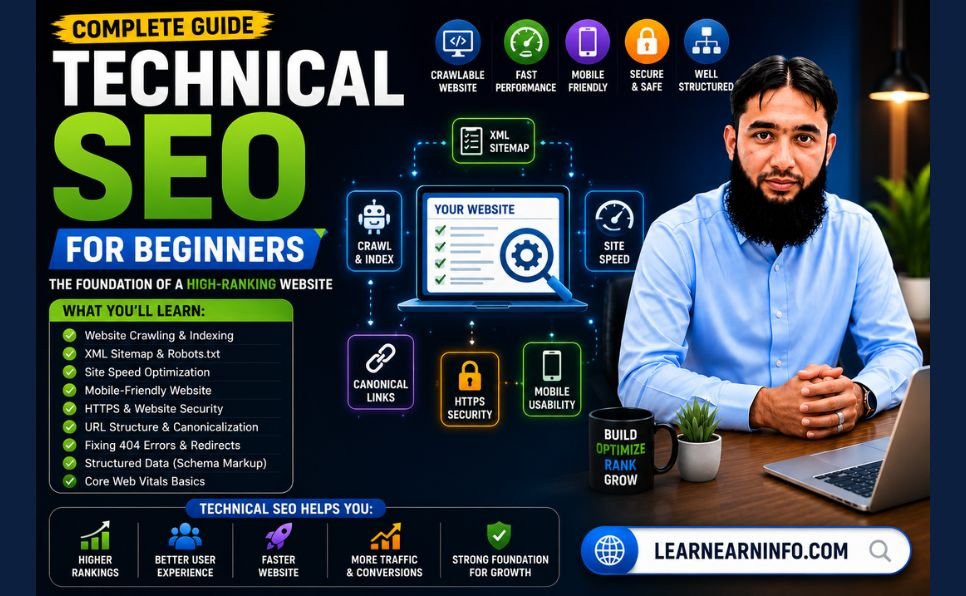
Technical SEO is the practice of optimizing a website’s infrastructure so search engines and AI crawlers can crawl, render, index, and serve your pages efficiently. It covers crawlability, indexation, site speed, mobile-friendliness, structured data, and security — the foundation every other SEO effort is built on.
Think of it this way: your content strategy, keyword research, and link building are the fuel in an engine. Technical SEO is the engine itself. Without it, none of the fuel produces movement.
In 2026, the scope of technical SEO has expanded significantly. Technical SEO is no longer just about ranking on Google. Your site also needs to be legible to AI engines like ChatGPT, Perplexity, Gemini, and Claude.Every major technical element you fix now improves both traditional search visibility and your likelihood of being cited in AI-generated answers — which represent a growing share of how people discover websites.
Organic search drives over 53% of all website traffic. Technical failures in that foundation cost websites rankings, traffic, and revenue — silently, often without obvious symptoms until rankings have already declined significantly.

How Technical SEO Differs From On-Page and Off-Page SEO
SEO has four distinct pillars, and understanding how they relate helps clarify where technical SEO fits:
Keyword Research — Finding the right terms to target before creating content. Covered in our how to do keyword research guide.
On-Page SEO — Optimizing the content and visible elements of individual pages — title tags, headings, content quality, internal links. Covered in our complete on-page SEO checklist.
Off-Page SEO — Building authority through backlinks from other websites. Covered in our guide on what is link building.
Technical SEO — This guide. Optimizing the infrastructure behind your website so search engines can access, understand, and trust everything else you have built.
Technical SEO holds the key to all other forms of SEO. If your site has crawl errors, duplicate content issues, or sluggish load times, search engines may never fully index your pages — and no amount of keyword targeting will fix that.
All four pillars work together. Technical SEO without content is a fast, empty website. Content without technical SEO is excellent material that search engines cannot reliably access or rank.
Section 1 — Crawlability: Help Google Find Your Pages
Before Google can rank any page on your website, it must first find and read it. This process — called crawling — is where technical SEO begins. If Google cannot crawl your pages, nothing else matters.
How Crawling Works
Google sends automated programs called Googlebot to visit websites and follow links from page to page, collecting information. Googlebot reads your pages the same way a browser would — loading HTML, following internal links, and reading the content it finds.
Problems with crawlability are among the most damaging technical SEO issues because they can prevent pages from being ranked entirely, regardless of their content quality.
Robots.txt — Tell Google What to Crawl
Your robots.txt file is a plain text file at the root of your website (yoursite.com/robots.txt) that instructs search engine crawlers which pages and sections they are allowed or not allowed to visit.
Most websites need very few restrictions in their robots.txt. The most common technical SEO mistake here is accidentally blocking important pages — including CSS and JavaScript files that Google needs to render your pages correctly.
Check your robots.txt by visiting: yoursite.com/robots.txt
Common issues to fix:
- Accidentally blocking
/blog/,/services/, or other important sections - Blocking CSS and JavaScript files (prevents Google from rendering pages correctly)
- Multiple or conflicting robots.txt files on different subdomains
Use Google Search Console to test specific URLs against your robots.txt file — it shows you immediately whether Googlebot is allowed to access each page.
XML Sitemap — Give Google a Map of Your Site
An XML sitemap is a file that lists every important URL on your website, helping Google discover pages it might not find through normal link-following. It is especially important for:
- New websites with few external links pointing to them
- Large websites where some pages are deep in the navigation structure
- Pages that are important but not well-linked internally
How to submit your sitemap:
- Create your sitemap (WordPress plugins like Yoast SEO or RankMath generate one automatically)
- Go to Google Search Console
- Navigate to Sitemaps in the left menu
- Enter your sitemap URL (usually yoursite.com/sitemap.xml)
- Click Submit
What to include in your sitemap: Only pages you want Google to index — published articles, service pages, your homepage. Exclude tag pages, author archive pages, and any paginated archive pages that do not provide unique value.
Crawl Budget — Don’t Waste Google’s Time
Google allocates a “crawl budget” to each website — a limit on how many pages it will crawl in a given period. For small websites (under 1,000 pages), crawl budget is rarely a problem. For larger sites, wasting crawl budget on unimportant pages means Google may not crawl important ones frequently enough.
Crawl budget wasters to eliminate:
- Faceted navigation creating thousands of duplicate or near-duplicate URLs (common on e-commerce sites)
- URL parameters generating multiple versions of the same page
- Infinite scroll pages without proper pagination
- Low-value pages like thin tag archives and empty category pages
Section 2 — Indexing: Make Sure Your Pages Actually Appear in Search
Crawling and indexing are different processes. Google crawls a page to read it, but then decides independently whether to add it to its index — the database from which search results are served. A page must be indexed to appear in search results.
Check Your Index Status
The fastest way to see whether a specific page is indexed is to search Google for site:yoururl.com/page-slug. If the result appears, the page is indexed. If it does not, something is preventing indexation.
For a comprehensive view of indexing status across your entire site, use Google Search Console → Pages (under Indexing in the left menu). This shows you which pages are indexed, which are not, and why.
The Noindex Tag — A Common Accidental Problem
A noindex tag is a directive you can add to a page’s HTML to tell Google not to include it in search results. This is intentional on pages like admin areas, thank-you pages, and duplicate content.
The problem: many websites accidentally add noindex tags to pages they do want indexed — especially during development or after a plugin misconfiguration.
Check for accidental noindex tags by:
- Visiting the URL in question
- Right-clicking and selecting “View Page Source”
- Searching (Ctrl+F) for “noindex”
- If it appears on a page you want indexed, remove it
Google Search Console’s Pages report also flags pages excluded due to noindex tags — review this regularly.
HTTP Status Codes — Return the Right Signals
HTTP status codes tell crawlers how to treat a URL — and in 2026 Google may skip rendering pages that return non-200 codes. Return 200 for live pages, 301 for permanent moves, 410 for permanently gone, and a real 404 for missing pages (no “soft 404s”). Eliminate redirect chains and loops; update internal links to point at final URLs.
The most important status codes for technical SEO:
200 OK — Page exists and is accessible. This is what every live page on your website should return.
301 Moved Permanently — The page has permanently moved to a new URL. Google transfers approximately 90% of the original page’s ranking authority to the new URL.
302 Found (Temporary Redirect) — The page has temporarily moved. Google does not transfer authority for temporary redirects. Use 301 for permanent URL changes.
404 Not Found — The page does not exist. A 404 response on a live page you want indexed is a critical error. Check regularly for 404s in Google Search Console.
500 Server Error — Your server failed to process the request. These prevent crawling and indexing entirely.
Canonical Tags — Prevent Duplicate Content Issues
A canonical tag is an HTML element that tells Google which version of a page is the “official” one when multiple URLs show the same or very similar content. Without canonical tags, Google may:
- Split ranking authority between duplicate versions of the same page
- Choose the wrong version to index
- Penalize sites it believes are intentionally duplicating content
Common canonical tag issues to fix:
- HTTP and HTTPS versions of the same page without canonical pointing to HTTPS
- www and non-www versions without canonical
- Paginated series without canonical pointing to the primary page
- URL parameter variations (like
?ref=social) creating duplicate pages
WordPress plugins like Yoast SEO and RankMath handle canonical tags automatically for most standard cases.
Section 3 — Site Speed and Core Web Vitals
Page speed has been a confirmed Google ranking factor since 2010. In 2026, the specific metrics Google measures have become more precise — and the bar has risen.
Core Web Vitals are a set of specific performance metrics that measure real-world user experience — covering loading performance, interactivity, and visual stability.
The Three Core Web Vitals for 2026
Largest Contentful Paint (LCP) — Target: Under 2.5 seconds LCP measures how long it takes for the largest visible element on your page to fully load — typically the hero image, featured image, or a large text block. This is what users experience as “how long before I can see the main content.”
The most common LCP problems:
- Large, uncompressed images above the fold
- Slow server response times
- Render-blocking JavaScript that delays content display
Interaction to Next Paint (INP) — Target: Under 200 milliseconds INP replaced Cumulative Layout Shift as a Core Web Vital in 2024. It measures how quickly your page responds after a user interaction — clicking a button, tapping a link, typing in a form field.
Poor INP is most often caused by:
- Heavy JavaScript that blocks the browser’s main thread
- Third-party scripts (chat widgets, analytics, ad scripts) running on page load
- Inefficient event handlers
Cumulative Layout Shift (CLS) — Target: Under 0.1 CLS measures how much page elements move unexpectedly while the page loads. A CLS score above 0.1 means your page layout is shifting in ways that frustrate users — images loading without reserved space, fonts swapping, ads appearing above content and pushing everything down.
Common CLS causes:
- Images without width and height attributes declared in HTML
- Web fonts that swap from system font to custom font after loading
- Dynamically injected content that pushes existing content down
How to Check Your Core Web Vitals
Use Google PageSpeed Insights — enter any URL and receive a score from 0 to 100 alongside specific diagnostics and improvement recommendations. Run both mobile and desktop tests — mobile scores are typically significantly lower and represent Google’s primary evaluation.
Google Search Console also provides aggregate Core Web Vitals data under the “Experience” section — showing how your pages perform in the real world based on actual Chrome user data (called field data), which is often more accurate than lab tests.
Practical Speed Improvements — What to Fix First
Image optimization — Images are the most common cause of slow LCP scores. Compress all images before uploading (targeting under 200KB for most blog images). Use WebP format, which produces files 25 to 35% smaller than JPEG with equivalent quality. Declare explicit width and height attributes for every image to prevent CLS.
Hosting quality — Cheap shared hosting with slow server response times limits your speed ceiling regardless of other optimizations. Target a Time to First Byte (TTFB) under 200 milliseconds. If your TTFB consistently exceeds 600 milliseconds, upgrading hosting will produce more speed improvement than any other single change.
Caching — Caching stores static versions of your pages so they serve faster to repeat visitors. WordPress users: WP Rocket, W3 Total Cache, and LiteSpeed Cache are reliable caching plugins. Enable browser caching as well — this stores CSS and JavaScript files in visitors’ browsers so they do not reload on every page visit.
Minimize JavaScript — Remove unused JavaScript and defer non-critical scripts. Third-party scripts — analytics, chat widgets, social sharing buttons — often significantly impact page speed. Audit which third-party scripts your site loads and remove any that are not essential.
Content Delivery Network (CDN) — A CDN serves your website’s files from servers geographically close to each visitor, reducing latency. Cloudflare’s free plan provides a functional CDN layer for most small to medium websites.
Section 4 — Mobile-First Optimization
Mobile optimization has become the single most important technical baseline in SEO. Google’s mobile-first indexing approach means the mobile version of your website is the primary version Google uses for both ranking and indexing. If your mobile experience is subpar, your rankings will reflect that — regardless of how good your desktop site looks.
Key Mobile Optimization Requirements
Responsive design: Your website layout must adapt seamlessly to all screen sizes without horizontal scrolling or content being cut off. Every modern WordPress theme is responsive by default — the issue arises when custom styling overrides responsive behavior.
Font size: Body text should be at least 16px on mobile. Smaller text forces users to pinch and zoom, which is a negative experience signal that Google tracks.
Tap target size: Buttons and links must be large enough to tap accurately — at least 48 by 48 pixels. Links that are too small or too close together create accidental taps and frustrated users.
No intrusive interstitials: Pop-ups that cover the full screen on mobile within seconds of page load are a confirmed ranking penalty signal since 2017. Google penalizes pages with interstitials that block content from mobile users — particularly if they appear before the user has read any content.
Test your mobile experience using Google’s Mobile-Friendly Test — enter any URL and receive an immediate assessment plus specific issues to fix.
Section 5 — HTTPS and Website Security
HTTPS (Hypertext Transfer Protocol Secure) is a confirmed Google ranking factor. Sites using HTTPS encrypt the connection between your server and the visitor’s browser — protecting sensitive data and providing a verified identity signal.
In 2026, HTTPS is a baseline expectation rather than a differentiator. Browsers display “Not Secure” warnings for HTTP sites — which significantly damages user trust and increases bounce rate, both of which affect rankings.
How to Ensure Your Site Uses HTTPS
- Install an SSL certificate on your hosting account (most hosting providers offer free SSL through Let’s Encrypt — check your hosting control panel)
- Configure your website to redirect all HTTP URLs to their HTTPS equivalents using a 301 redirect
- Update your website’s canonical URL to HTTPS in settings
- Check that all internal links use HTTPS — mixed content (an HTTPS page loading HTTP resources) triggers browser security warnings
Use Google Search Console to verify that Google sees your HTTPS version as the canonical site. Check your Coverage report for any pages still being indexed at HTTP addresses.
Section 6 — Site Architecture and Internal Linking
How your website is structured — how pages connect to each other — has direct implications for both user experience and technical SEO performance.
URL Structure
Good URL structure is consistent, descriptive, and follows a logical hierarchy:
yoursite.com/seo/technical-seo-for-beginners/— clear, descriptive, hierarchicalyoursite.com/?p=1234— meaningless to both users and search engines
Keep URLs short, use hyphens between words, use lowercase only, and include your focus keyword. Once a URL is set and indexed, avoid changing it — URL changes require 301 redirects that lose some link equity.
Site Depth — Keep Important Pages Shallow
Every page on your website should ideally be reachable within three clicks from your homepage. Pages buried deeper in your site architecture receive less crawl attention and less internal link authority — which reduces their ranking potential.
Review your most important service and blog pages. If any require more than three clicks to reach from the homepage, revise your navigation or add additional internal links from shallower pages to bring them closer to the surface.
Internal Linking Architecture
Strong internal linking is one of the most underutilized technical SEO improvements available. It helps Google:
- Discover pages it might otherwise miss
- Understand the topical relationships between your pages
- Distribute ranking authority from strong pages to weaker ones
Every article you publish should link to three to five related existing articles. Your highest-authority pages — those with the most external backlinks — should link to pages you most want to rank. This transfers authority deliberately rather than leaving it concentrated on a single page.
For a complete understanding of how link building and internal links work together to build what is domain authority, read our dedicated guide.
Breadcrumbs
Breadcrumbs are navigational links at the top of content pages that show the page’s location in your site hierarchy — for example: Home > SEO > Technical SEO for Beginners.
They serve two purposes in technical SEO:
- They improve user experience by showing where a page sits in your site’s structure
- They create an additional internal linking layer that reinforces your site architecture
- Google often displays breadcrumb paths in search results instead of the full URL, which can improve click-through rates
Section 7 — Structured Data and Schema Markup
Schema markup is code added to your pages that helps search engines understand precisely what your content means — not just what it says. In 2026, schema has become more important than ever for both traditional search rankings and AI search visibility.
Structured data helps search engines understand what your content is about, not just what it says. In 2026, this matters for traditional search and AI search alike. Schema markup tells Google the specific meaning behind your content. A product page isn’t just text. It’s a product with a price, availability, reviews, and specifications. Schema makes that explicit.
Most Valuable Schema Types for Blogs and Service Websites
Article / BlogPosting Schema Marks your blog posts as articles, including author, publish date, and update date. This supports EEAT in SEO signals by connecting your content to a named, verifiable author entity.
Every content page should include Article or BlogPosting markup with at minimum: headline, author (as a Person entity with name and credentials), datePublished, dateModified, and publisher.
FAQ Schema Marks up question-and-answer sections within your content. Pages with FAQ schema frequently appear as expanded rich results in Google — showing the questions and answers directly on the search results page, which significantly increases visibility and click-through rate.
HowTo Schema Marks step-by-step instructional content. Eligible for rich results that display your steps directly in search — highly valuable for tutorial and guide content.
Organization Schema Establishes your website’s organizational identity — name, logo, contact information, and links to your social profiles. This is foundational for AI systems that need to understand who publishes your content.
BreadcrumbList Schema Tells Google the navigation hierarchy of each page, enabling breadcrumb display in search results.
How to Implement Schema Without Coding
WordPress users: Yoast SEO and RankMath both automatically generate the most important schema types (Article, Organization, BreadcrumbList) without any manual coding. Enable the schema settings within your plugin’s configuration.
For FAQ schema, you need to either add it manually or use a plugin that supports it — RankMath Pro includes FAQ schema blocks.
Validate your schema implementation using Google’s Rich Results Test — enter any URL and see exactly which schema types Google detects and whether they contain any errors.
For the full definition of how schema fits into your broader structured data strategy, reference Schema.org — the official vocabulary for structured data markup used across all major search engines.
Section 8 — Duplicate Content
Duplicate content exists when the same or very similar content appears at multiple URLs on your website. This creates several technical SEO problems:
- Google may not know which version to index and rank
- Ranking authority is split between duplicate URLs instead of concentrated on one
- Google may index the wrong version and ignore the one you want ranked
Common Duplicate Content Causes
URL parameter variations: A page accessible at both /blog/post/ and /blog/post/?ref=newsletter has two URLs serving identical content. Configure URL parameters in Google Search Console to tell Google which variations to ignore.
www vs non-www: Your website should be accessible at only one of these — ensure www.yoursite.com and yoursite.com both redirect to the same canonical version, and that your canonical tags confirm which is the primary version.
HTTP vs HTTPS: If pages are accessible at both http:// and https:// addresses, set up 301 redirects from HTTP to HTTPS and ensure canonical tags point to the HTTPS version.
Printer-friendly page versions: If your website generates separate printer-friendly URLs for content pages, add noindex tags to the printer versions.
Pagination: Category and archive pages paginated across multiple pages can create near-duplicate content. Use canonical tags on paginated pages pointing to the primary page, or use rel=”next” and rel=”prev” pagination markup.
Section 9 — Technical SEO for AI Search in 2026
The most significant new dimension of technical SEO in 2026 is optimization for AI-powered answer engines — ChatGPT Search, Perplexity, Google AI Overviews, and similar systems that generate answers by reading and synthesizing content from websites.
2026 is the first real AI search era. Your content needs to be AI-friendly at a technical and structural level. Google’s Search guidance on generative AI emphasizes creating helpful, people-first content with clear structure, accurate information, and strong expertise signals.
What AI Crawlers Need From Your Website
AI answer engines need to be able to:
- Access your content — the same crawlability requirements that apply to Googlebot apply here
- Read it clearly — clean HTML structure, minimal JavaScript dependency, logical heading hierarchy
- Understand who created it — author entities, Organization schema, and clear EEAT in SEO signals
- Trust it — external citations, factual accuracy, and consistent entity identity across the web
Practical AI Optimization Steps
Use the “Golden Answer” format: When covering a question, provide a direct, concise answer (ideally 40 to 60 words) immediately after the relevant H2 heading. AI systems frequently extract this format for direct answers. This is why this guide opens each section with a direct explanation before expanding into detail.
Structure content with clear question-based headings: H2 and H3 headings phrased as questions (“What Is Technical SEO?” “How Does Core Web Vitals Work?”) are easier for AI systems to parse and match to user queries.
Implement Organization and Person schema: AI systems use schema to verify who created content and whether they are a credible source. Link your Organization schema to verified profiles — LinkedIn, GitHub, or other established platforms — using the SameAs property.
Ensure your robots.txt does not block AI crawlers: Some AI search engines use their own crawl bots. Unless you have a specific reason to block them, ensure your robots.txt allows the major AI crawlers access to your content.
Section 10 — Broken Links and Redirect Management
Broken links — both internal links pointing to non-existent pages and external links from your pages to pages that no longer exist — create poor user experiences and waste crawl budget.
Finding and Fixing Broken Internal Links
Use Google Search Console → Pages → Not Found (404) to see which URLs on your site are returning 404 errors. For each 404:
- If the page should exist — restore it or check for a technical issue causing the error
- If the page was permanently deleted — set up a 301 redirect to the most relevant alternative page
- Update any internal links on your site pointing to the old URL to point directly to the new destination
Avoid creating redirect chains — sequences where Page A redirects to Page B which redirects to Page C. Each additional hop in a redirect chain loses some link equity and slows page loading. Consolidate chains into single-hop redirects.
Managing External Broken Links
Links from your pages to external websites can break when those sites remove or move content. Broken outbound links are a minor negative signal — they suggest your content is not being maintained. Run a site crawl quarterly (using free tools like Screaming Frog’s limited free version or Google Search Console) and fix or remove broken external links.
Technical SEO Audit Checklist — Quick Reference
Use this checklist when auditing any website:
Crawlability
- robots.txt allows important pages — verify CSS and JS are not blocked
- XML sitemap created and submitted to Google Search Console
- No important pages blocked from crawling
Indexing
- All important pages are indexed (check Search Console Pages report)
- No accidental noindex tags on pages that should rank
- Canonical tags set correctly on all pages — no conflicting canonicals
- HTTP status codes correct — 200 for live pages, 301 for moved pages
Speed and Core Web Vitals
- PageSpeed Insights score above 70 on mobile
- LCP under 2.5 seconds
- INP under 200 milliseconds
- CLS under 0.1
- All images compressed and in WebP format
- Images have explicit width and height attributes
- Caching enabled
- Unnecessary JavaScript removed or deferred
Mobile
- Responsive design confirmed on multiple device sizes
- Text size minimum 16px
- Tap targets minimum 48×48 pixels
- No intrusive full-screen pop-ups on mobile
Security
- SSL certificate installed — all pages serve HTTPS
- 301 redirect from HTTP to HTTPS in place
- No mixed content warnings (HTTP resources on HTTPS pages)
Site Architecture
- All important pages reachable within 3 clicks from homepage
- Clean, descriptive URL structure — no parameter-heavy URLs
- Internal links connect related pages with descriptive anchor text
- Breadcrumbs implemented where appropriate
Schema Markup
- Article / BlogPosting schema on all content pages
- Organization schema on homepage
- FAQ schema on relevant question-based content
- No schema errors (validated via Google’s Rich Results Test)
Duplicate Content
- Single canonical version of site (www or non-www, HTTP or HTTPS)
- URL parameters managed in Search Console
- No near-duplicate pages without canonical tags
Broken Links
- No internal 404 errors (check Search Console)
- No redirect chains — all redirects are single-hop 301s
- No broken external links on key pages
How Often Should You Run a Technical SEO Audit?
Monthly for large sites (e-commerce, news, corporate). Quarterly for small to medium businesses. Always after website redesigns or platform migrations. After major algorithm updates. When experiencing sudden traffic drops.
For most blogs and small business websites, a quarterly audit using Google Search Console and Google PageSpeed Insights is sufficient — supplemented by a full crawl-based audit using dedicated tools annually or after any major site changes.
Set monthly reminders to check Search Console for:
- New 404 errors or crawl issues
- Core Web Vitals regressions
- Pages that have dropped from indexing unexpectedly
- Manual action notifications
When Technical SEO Requires Professional Help
Most of the technical SEO issues in this guide can be identified and fixed by a website owner with no coding experience, using the free tools referenced throughout. The checklist above is designed to be actionable without developer assistance.
However, some technical issues — JavaScript rendering problems, server configuration errors, complex redirect structures after site migrations, and enterprise-level crawl budget optimization — benefit from specialist expertise.
If your technical audit reveals issues you cannot resolve independently, or if your website has undergone a recent migration and traffic has dropped, our professional SEO services include full technical auditing and remediation as part of a complete SEO engagement.
Download our free SEO checklist to get an immediate snapshot of where your site stands across all major SEO factors — technical, on-page, and off-page — in one structured document you can work through systematically.
For the content and link building work that builds on your technical foundation, explore our content writing services and guest posting services.
Final Thoughts
Technical SEO is not the most visible or creative part of search engine optimization — but it is the most foundational. Everything else you invest in — keyword research, content creation, link building — depends on a clean technical foundation to deliver results.
The good news: most technical SEO fixes are not complex. Finding them is usually harder than fixing them. The checklist in this guide gives you a systematic way to find every major issue on your website, and the free tools referenced give you everything you need to diagnose and resolve them.
Your content strategy, your link building, your on-page optimization — all of it depends on a clean technical setup. And in 2026, the bar is higher than it used to be. Google’s crawl systems are more sophisticated. Core Web Vitals still matter a lot. And now you have AI search engines crawling your site too. If your technical foundation has gaps, you are invisible in two ecosystems instead of one.
Work through the checklist section by section. Fix the highest-impact issues first. Then revisit quarterly to catch new problems before they affect rankings.
For the complete picture of how to rank on Google’s first page — combining technical SEO with content, keywords, and link authority — read the full strategy guide. And use our boost your SEO rankings guide for the next steps after your technical foundation is solid.
What is the most confusing technical SEO issue you have encountered on your own website? Drop it in the comments — we answer every question.
Related Articles: