Table of Contents
-
Introduction
-
Why Reverse Image Search Matters Today
-
-
Why You Should Be Using Reverse Image Search
-
Key Use Cases Across Industries
-
Everyday Benefits for Users
-
-
How Reverse Image Search Works
-
Behind the Technology
-
AI & Pattern Recognition Explained
-
-
Step-by-Step: How to Do a Reverse Image Search
-
Step 1: Choose the Right Tool
-
Step 2: Upload or Paste the Image
-
Step 3: Analyze the Results
-
Step 4: Find the Original or Contact the Creator
-
-
Popular Use Cases of Reverse Image Search
-
Find the Source of a Viral Meme
-
Discover Similar Images for Creative Use
-
Check for Stolen or Reused Content
-
Verify Online Product Photos
-
Track Stock Image Licensing and Misuse
-
-
Top Reverse Image Search Tools in 2025
-
Comparison Table
-
Tool-by-Tool Breakdown
-
-
Pro Tips for Better Search Results
-
Getting the Most from Each Search
-
Tricks for Hard-to-Find Images
-
-
Conclusion
-
Final Thoughts and Takeaways
-
Get Started with a Free Tool Now
-
-
FAQs About Reverse Image Search
Introduction
Reverse Image Search: How to Find the Source of Any Image
Whether you are a marketer, blogger, influencer, or a product manager, finding the source of any image is important for your content. If someone stole your photo and used it for their branding without credit, and thought, “Where did this come from?” Maybe it was a meme, a suspicious product picture, or even a stock image that felt a little too familiar. Whatever the case, reverse image search is your ultimate solution—and the best part? You can do it all for free.
Verifying photo ownership, uncovering the authentic source, or just looking to find similar images, this article will show you a practical guide on how to do a reverse image search to find the genuine source of an image step-by-step—and why it’s more useful than you think.
Why You Should Be Using Reverse Image Search
Reverse image search isn’t just a geek tool anymore. It’s a must-have skill for:
- Journalists verifying visual sources
- Marketers protecting brand content
- Designers looking for similar stock photos online
- Regular users check if a product image is legit
- Businesses are checking if their content is being reused
With just one photo, you can access a whole network of similar images, source details, copyright info, and more—all from a reverse image search and recognition tool.
How Does Reverse Image Search Work
It’s not magic—it’s pattern matching.
When you upload or paste an image into an image search engine, it scans that image’s shapes, colors, and metadata to find visually and structurally similar content across the web. This process is often powered by AI-based image recognition and large visual databases.
Tools like Google Images, Bing, Yandex, and Copy Checker all offer similar image search by image capabilities, often with cross-platform support.
How to Do a Reverse Image Search: Step-by-Step
Step 1: Choose Search Tool
Here are the best platforms to perform a reverse image lookup:
- Google Images – most popular, decent database
- Copy Checker Reverse Image Search Free – scans multiple engines at once
- TinEye – best for historic image tracking
- Bing Visual Search – good for commercial product matches
- Yandex – great for facial matches and obscure image sources
Step 2: Upload or Paste the Image
Options:
- Paste the image URL
- Upload from your device
- Use drag-and-drop (on desktop)
- Snap and search via phone (for mobile tools like Google Lens)
Step 3: Analyze the Results
What to look for:
- The oldest appearance of the image
- Watermarked sources that might hint at ownership
- Stock photo sites (e.g., iStock, Shutterstock)
- Blog posts using the same image (good for context)
If you’re researching face recognition search, be aware that ethical and privacy considerations vary by region.
Step 4: Find the Original or Contact the Creator
Once you locate the origin, you can:
- Credit the author if you plan to use the image
- Reach out for collaboration or permission
- Avoid copyright issues altogether
Use an image copyright checker online for free to ensure you’re not infringing on licensed content.
Use Cases: What You Can Do With Reverse Image Search
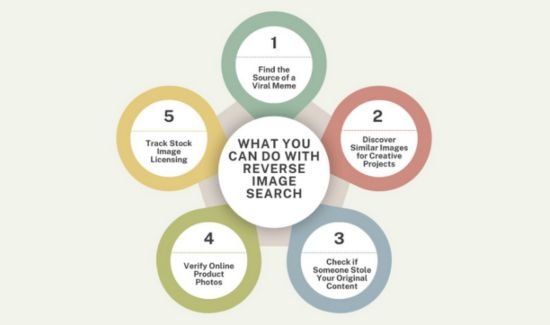
1. Find the Source of a Viral Meme
Meme pages rarely credit original creators. Do a photo lookup or search by image, and you’ll often uncover the first version—sometimes even from Reddit or Tumblr.
2. Discover Similar Images for Creative Projects
Need an image like the one you found, but can’t use it due to copyright? A similar image search will help you find visually similar images that you can search with some keywords.
Try:
- Similar image finder
- Find similar photos
- Find similar pictures online
Especially useful for design inspiration, ads, and thumbnails.
3. Check if Someone Stole Your Original Content
Photographers, bloggers, and brands can use duplicate image search to scan for websites using their graphics or infographics without credit.
Turn those results into backlinks or copyright enforcement.
4. Verify Online Product Photos
If a seller posts a product image that looks familiar, use a reverse image search free tool to check if it’s stolen from another brand or stock platform. Super helpful for avoiding scams.
5. Track Stock Image Licensing
Even when using stock photos, ensure no one is abusing the same image for shady purposes. Use a search by image tool to find sites using the same photo and confirm it to boost your brand with a digital marketing strategy.
Best Reverse Image Search Tools in 2025
| Tool | Best For | Link |
| Copy Checker | Multi-engine visual search | copychecker.com |
| Google Lens | On-the-go mobile scanning | Built into Google Photos/Chrome |
| TinEye | Historical & copyright image tracking | tineye.com |
| Yandex Images | Face recognition & obscure matches | yandex.com/images |
| Bing Visual Search | Commercial, product-based queries | bing.com/visualsearch |
Pro Tips for Reverse Image Search Success
- Use high-resolution images for better matching
- Crop out text or borders for purer results
- Search using multiple engines for wider coverage
- Use variations (e.g., resized or filtered images) if needed
Want to find relevant pictures online from a single photo? These tricks help widen your net.
Conclusion
Whether you’re looking to find similar images online, track stolen content, verify sources, or search using a reference image, reverse image search is your easiest solution tool and insight.
Let the tools do the work. Use reverse picture lookup, check with an image copyright checker, and uncover where your favorite visuals began.
Want to try it now? Run a free scan using the AI Reverse Image Search Tool—and see what your image reveals.
FAQs About Reverse Image Search
Q: Does reverse image search perform on my phone?
▶︎ Yes! These tools can easily perform a reverse image search on mobile using Google Lens, Copy Checker, or TinEye. These tools let you upload a photo or screenshot and instantly search similar images online, making it perfect for social media verification, product research, or content tracking on the go.
Q: Is reverse image search free?
▶︎ Absolutely. Most of the leading tools offer reverse image search for free with no signup required. You can find similar images, search by image, and identify duplicate content with just a few clicks, at zero cost.
Q: Can reverse image search detect edited images?
▶︎ It depends on the tool. Some tools, like Yandex and Google Lens, are good at detecting visually similar images, even if filters or slight edits are applied. For best results, use high-resolution images and try different cropped versions to match variations.